Power EQ
- 4.5
- Rating
- 50.00K
- Installs
- Free
- Price
 Analysis by App-foxy
I noticed Power EQ because it takes a very direct approach to mobile audio: instead of trying to be a music library, streaming service, or social platform, it focuses on controlling the sound coming from your device. That narrow purpose is its biggest strength. When I want to make spoken audio clearer, add a little weight to music, or tame harsh high frequencies, I would rather open a focused equalizer than dig through the settings of several unrelated apps.
Developed by ICC Tech, this free Music & Audio app is aimed at people who want more control over everyday listening without committing to a complicated audio workstation. It is suitable for Everyone, works on Android devices running version 7.0 or later, and has reached over 50K installs. Its current version is 1.0.5, while the app itself was released on January 20, 2026. Those details place it in the accessible end of the audio-tool category rather than the specialist studio market.
My overall impression is positive, but with an important qualification: an equalizer can only adjust the signal that the phone and audio app expose to it. The experience therefore depends not only on Power EQ, but also on the music player, headphones, Bluetooth connection, and Android device involved. That makes connectivity a surprisingly important part of judging it. The controls may be simple, yet the result can change when I move from wired listening to a wireless speaker or from music to video.
You May Also Like

 AccuWeather: Weather Radar
AccuWeather Review: A Quick, Clear Forecast for Everyday Decisions
For everyday plans, the best forecast is the one you can understand quickly. AccuWeather makes rain timing, radar, and local conditions easy to act on, with a few trade-offs.

 Hill Climb Racing
Why Hill Climb Racing Still Turns Crashes Into One More Run
A tiny car, a bumpy hill and one more upgrade: Hill Climb Racing keeps resurfacing because its simple chaos makes every near-miss feel personal.

 AliExpress - Shopping App
AliExpress Makes Global Shopping Feel Personal, but Shoppers Bear the Risk
AliExpress turns a global marketplace into a pocket-sized discovery engine. Its reach is useful, its shopping loop compelling, and its trade-offs easy to miss.

 Lords Mobile: Kingdom Wars
Lords Mobile Is a Kingdom-Building Routine, Not a Quick Match
A case-by-case verdict on the building, battles, device demands, and social commitments that make Lords Mobile rewarding for some players and exhausting for others.

 PDF Scanner app - TapScanner
TapScanner Makes Paperwork Easier to Capture, Check, and Share
TapScanner makes scanning with a phone feel less like a rescue operation and more like a dependable step in getting work done. Its capture tools are useful, though not flawless.

 Block Blast!
 Shows How Much a Puzzle Game Can Leave Out
A quiet grid game shows why puzzle players increasingly value instant clarity, repeatable skill and low-pressure play—and where the genre still needs to catch up.
More From Our News Desk
View All News


How Power EQ fits into everyday listening
I find Power EQ most useful when I treat it as one link in a listening routine, not a fix for every audio problem. In this section, I’ll look at how it fits alongside the source app and the device I’m using, then focus on the practical handoffs that can change the result. That makes it easier to decide when a quick sound adjustment is worth the extra step.
A focused controller rather than another music destination
The first thing I appreciate is the app’s role. Power EQ is not asking me to replace my existing music collection or change the way I discover tracks. I can keep using the services and players I already prefer, then use the equalizer as a layer of control over the listening experience. That makes it easier to understand than an app that combines playlists, streaming, downloads, visual effects, and audio adjustments in one crowded interface.
That focus also creates a practical advantage for households with different listening preferences. One person may prefer a warmer sound with stronger low frequencies, while another may want speech to stand out more clearly. A dedicated equalizer gives each listener a way to make adjustments without changing the source material itself. I find that especially useful when switching between small phone speakers, earbuds, and a larger external speaker.
The app’s store summary calls it an ultimate audio experience controller, while its short description presents it as a power EQ. I would interpret that less as a promise of professional mastering and more as a signal that the app is built around hands-on sound shaping. It is most appealing when I want an immediate change rather than a long technical explanation of frequency response.
What changes when the connection changes
Connectivity affects this kind of tool in several ways. If I am listening to locally available audio or using a player that already has the track ready, the main question is whether the equalizer remains active while I move through the app. If I am streaming, network interruptions can pause the source even though the equalizer itself may still be open. In that situation, Power EQ cannot repair a stalled stream; it can only influence audio that is actually reaching the device.
Bluetooth introduces another layer. Pairing a phone with earbuds, a car system, or a speaker can change the perceived balance because every output device has its own tuning. A setting that sounds comfortable through compact earbuds may feel too heavy through a car’s built-in speakers. I therefore treat each listening environment as a separate adjustment problem instead of assuming one profile will suit everything.
This is one of the less obvious lessons of using an equalizer: the best setting is not necessarily the one that sounds most dramatic for a few seconds. Excessive bass can make a track seem impressive at first but muddy after a full commute. Likewise, pushing treble to make voices sharper can turn cymbals and background noise into fatigue. I get better results by making small changes, listening for a full section of a song or conversation, and then deciding whether the adjustment actually helps.
A realistic mobile scenario
Imagine a morning commute where I start with a podcast on wireless earbuds, switch to music, and later connect the phone to a portable speaker at work. Speech may benefit from a different balance than music, and the speaker may already emphasize bass. Power EQ is useful in that scenario because it gives me a central place to make corrections, but it also requires attention. I should not assume that a profile created for the earbuds will sound right on the speaker.
For podcasts and spoken recordings, I would begin conservatively. Raising the upper range can help consonants feel more distinct, but too much can highlight microphone hiss or room noise. For music, I would first lower frequencies that feel overpowering before raising everything else. This “cut before boost” approach often keeps the overall sound more comfortable and avoids turning the output into an unnecessarily loud, tiring signal.
On a phone, small changes are easier to judge with familiar material. I like using one well-recorded song, one ordinary spoken recording, and a quiet section rather than testing only with a loud chorus. That reveals whether a setting is genuinely balanced. It also helps separate the equalizer’s effect from the source’s own compression or from the limitations of the connected headphones.
Where it is more convenient than the usual alternatives
Many music players include their own equalizer, but those controls may apply only inside that particular player. A phone’s system audio settings can be broader, yet they may be buried among unrelated options or differ substantially between manufacturers. Power EQ occupies a useful middle ground: it is more dedicated than a basic device setting and potentially more convenient than repeatedly opening individual player controls.
There is a trade-off, though. A player-specific equalizer may behave more predictably because it is built into the playback engine. In contrast, a separate audio controller depends on how Android routes sound and how other apps handle audio effects. If I need exact, app-by-app processing for recording or production work, a specialist audio application is likely a better choice. Power EQ makes more sense for casual listening adjustments than for mixing, mastering, or laboratory-style sound correction.
The app’s rating sits at a 4.5 average from around 160 ratings, with 8 written reviews. That is encouraging, but I would still treat it as an early signal rather than proof that every phone and output device will behave identically. Audio software is particularly sensitive to hardware combinations, so my own decision would depend on whether I want simple control or guaranteed professional consistency.
Handling interruptions and recovery
Network failure is not the only interruption worth considering. A Bluetooth device can disconnect, an audio app can pause, or Android can shift output when another accessory becomes active. When that happens, I first restore the source connection before changing the equalizer. Otherwise, it is easy to mistake silence or a changed output route for a problem with the sound settings.
My preferred recovery routine is simple: confirm that the music or spoken audio is playing, check which output is selected, then reopen or revisit the equalizer if the effect seems different. I avoid making several dramatic adjustments during an interruption because I may be compensating for a temporary routing issue. Once playback is stable, I can judge the sound accurately again.
This matters especially with streaming. If a connection drops, the source may buffer or stop while the controller remains visible. The presence of an equalizer screen does not mean the network-dependent content is available. I would not choose Power EQ as a solution to unreliable streaming; I would choose it to shape whatever audio my existing playback setup successfully delivers.
There is also a practical reason to keep expectations modest during calls, live broadcasts, and rapidly changing content. These sources can vary in loudness and quality from moment to moment. A setting that improves one segment may make the next segment less comfortable. For those situations, a restrained profile is safer than chasing every change with constant slider movements.
Using it without wasting mobile data
Power EQ belongs to the control side of listening, not the content-delivery side. The main data use in a typical setup is therefore likely to come from the streaming service, video app, or online radio source I use alongside it, rather than from adjusting the sound itself. That distinction is helpful when planning mobile use: changing the EQ does not replace the need to manage the network behavior of the source app.
If I am trying to conserve data, I would handle that in the streaming app by choosing an appropriate quality setting, using content that is already available on the device when that option exists, and avoiding repeated high-quality streams over cellular service. Power EQ can then remain part of the listening chain without becoming the focus of the data decision.
I would also avoid repeatedly switching between several online sources just to compare presets. That creates unnecessary loading and makes the comparison less controlled. A better test is to use the same short section of audio, keep the output device unchanged, and adjust one part of the sound at a time. This gives me a clearer idea of whether the setting is helping, while reducing needless network activity from the surrounding apps.
Bluetooth itself is worth separating from internet use. Sending audio from a phone to wireless headphones does not mean the headphones are independently streaming the track. The phone may still be receiving the content through Wi-Fi or mobile data and then forwarding it over Bluetooth. If playback stops, I check both links: the internet connection feeding the source and the local wireless connection feeding the headphones.
Specific listeners who will get the most from it
I think Power EQ is a good match for someone who notices that the same song sounds very different across devices and wants a quick way to correct it. It is also useful for listeners who alternate between music, podcasts, videos, and spoken recordings and prefer not to accept the default tuning every time. The free price lowers the barrier to trying that approach, particularly for people who do not need recording tools or advanced production controls.
It may also suit a person with a small set of familiar headphones who wants to make them more comfortable for longer sessions. The key is moderation. An equalizer can reveal detail, reduce an irritating emphasis, or make speech easier to follow, but it cannot turn basic hardware into a completely different class of product. If the earbuds distort at higher volume, software adjustment is not a substitute for lowering the volume or replacing the hardware.
I would be more cautious recommending it to musicians who need precise monitoring, creators working on mixes, or anyone who expects identical results across every app and connected device. Those users may prefer a tool integrated directly into their playback or production environment. I would also skip it if I rarely adjust sound and feel comfortable with the defaults; adding another control layer is not automatically an improvement.
Small techniques that make the app more useful
One useful habit is to make a “comfort” setting rather than a “wow” setting. I listen for ten minutes, then ask whether the sound remains pleasant instead of judging it after one bass-heavy moment. This exposes exaggerated adjustments that initially seem exciting but become tiring during a longer session.
A second technique is to compare at equal perceived loudness. Boosting a frequency range can make the whole output seem louder, and louder often sounds better for a short comparison even when it is not more accurate. I lower the overall level when necessary, switch between the adjusted and unadjusted sound, and decide based on clarity and comfort rather than volume alone.
A third is to test the same adjustment on both a dense music track and a sparse recording. Dense tracks reveal muddiness, while sparse recordings reveal hiss, sharpness, or unnatural tonal changes. If a setting works only on one type of material, I would keep it as a situational adjustment rather than treating it as my permanent choice.
A fourth is to change the output device before finalizing anything. Earbuds, a car system, and a portable speaker can respond very differently. I would make the smallest correction needed for each one and avoid assuming that a dramatic setting is evidence of better control. This is particularly important when the phone moves between Wi-Fi listening at home, cellular streaming outdoors, and Bluetooth playback in a vehicle.
What the current release means for a new user
The current version is 1.0.5, so I approach it as a relatively young app rather than a deeply established audio platform. That does not make it unsuitable, but it does affect how I evaluate it. I pay attention to whether my preferred player remains compatible, whether the effect stays consistent after reconnecting headphones, and whether switching between apps changes the result.
Because the app is free and rated for Everyone, it is easy to try without making it a major commitment. I would install it, test it with the audio sources I actually use, and remove it if it adds confusion instead of control. The most important test is not a generic demo track; it is a normal day involving my own headphones, my own streaming habits, and the places where I usually lose or change connectivity.
The install base of over 50K suggests that it has attracted a meaningful audience, but I still would not assume universal behavior. Android audio routing can vary by manufacturer and by accessory. If a user depends on a particular car stereo, Bluetooth speaker, or specialized player, that setup should be tested directly before relying on the app for daily listening.
My connectivity verdict
Power EQ works best when I view it as a practical sound-adjustment layer, not as a replacement for a music service or a fix for network problems. Its value appears when the source is playing normally and I want to shape the output for a particular listener, recording, or device. Connectivity determines whether the audio arrives and where it goes; the equalizer helps decide how that arriving signal feels.
I like the app’s focused purpose, free access, and suitability for ordinary Android listening. I also appreciate that it encourages a more deliberate relationship with sound: small corrections, careful comparisons, and separate expectations for each output device. The friction comes from the surrounding ecosystem. Different players, Bluetooth routes, streaming interruptions, and hardware tuning can make the experience less predictable than a built-in control.
My recommendation is therefore straightforward. Try Power EQ if you regularly switch between audio devices or find yourself wishing that music and speech had more flexible tonal control. Test it during real mobile use, including the moments when a connection changes, rather than judging it only at home. Skip it if you need studio-grade precision, guaranteed app-specific behavior, or a complete music platform. For everyone else, the best results come from using Power EQ as a careful finishing tool, not a volume booster.
ICC Tech has made an approachable entry for listeners who want more influence over everyday audio without paying for a larger production suite. Its 4.5 average is a promising sign, and the free model makes experimentation easy. In my experience, the app is most convincing when it stays in the background: the stream, podcast, or video remains the focus, while the sound feels a little more suited to the phone, headphones, connection, and moment I am actually in.
FAQs for Power EQ
01What is Power EQ and how does it work?
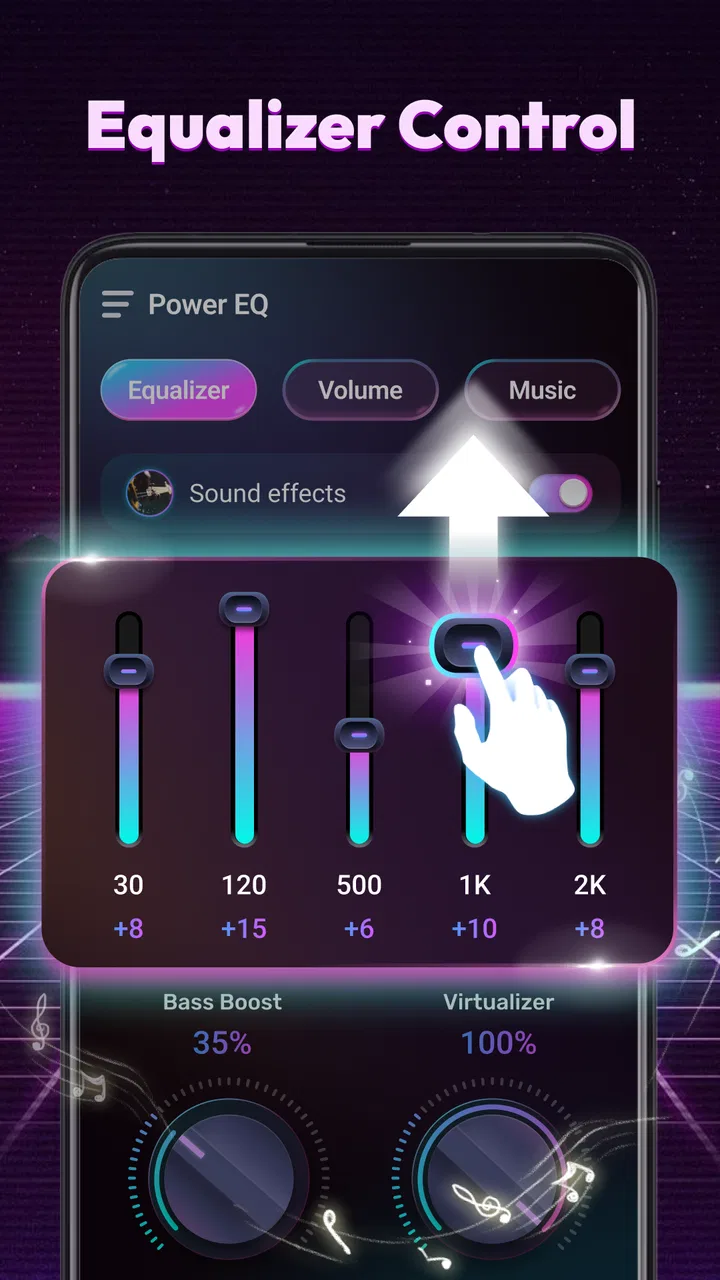
Power EQ is an advanced equalizer app designed to enhance your audio experience on Android and iOS devices. It allows users to customize sound settings through a variety of presets and manual adjustments. With features like bass boost, 3D surround sound, and customizable audio filters, users can tailor their music playback to suit their preferences. Whether you're listening through headphones or speakers, Power EQ aims to deliver optimal sound quality.
02Is Power EQ compatible with all music streaming services?
Power EQ is compatible with most popular music streaming services and local audio files. However, compatibility may vary depending on the specific service's API restrictions. It's always a good idea to check the app's description or visit the developer's website to see a detailed list of supported services. Generally, major platforms like Spotify, Apple Music, and YouTube Music are supported, allowing for seamless integration and enhanced audio output.
03Does Power EQ offer a free version, and what features are included?
Yes, Power EQ offers a free version with a range of basic features, allowing users to experience the app's core functionalities. This includes access to a limited number of equalizer presets, basic audio enhancement tools, and standard usage without ads. For more advanced features such as premium presets, ad-free experience, and additional customization options, users can opt for the paid version.
04How user-friendly is the interface of Power EQ?
Power EQ boasts a user-friendly interface designed with simplicity and functionality in mind. The app features intuitive navigation, making it easy for users of all technical levels to adjust settings and explore features. With clear icons, straightforward menus, and a sleek design, users can quickly find and apply the audio adjustments they desire without hassle.
05What are the system requirements for installing Power EQ?
Power EQ is designed to run smoothly on both Android and iOS platforms. For Android users, the app typically requires a device running Android 5.0 (Lollipop) or later. For iOS users, it usually needs iOS 11.0 or newer. Adequate storage space and a stable internet connection are recommended for optimal performance and seamless streaming integration. Be sure to check the app store listing for any specific updates on system requirements.
Pros
- User-friendly interface for easy navigation.
- Wide range of customizable sound settings.
- Seamless integration with music apps.
- Low battery consumption during use.
- Regular updates enhance performance.
Cons
- Limited free features in the basic version.
- Some users report occasional app crashes.
- Advanced settings may confuse beginners.
- Requires internet for initial setup.
- Ads can be intrusive in free version.

Power EQ
Gallery